Backend-Core
Dev URL: https://api-dev.tokenise.io
Position in the Architecture
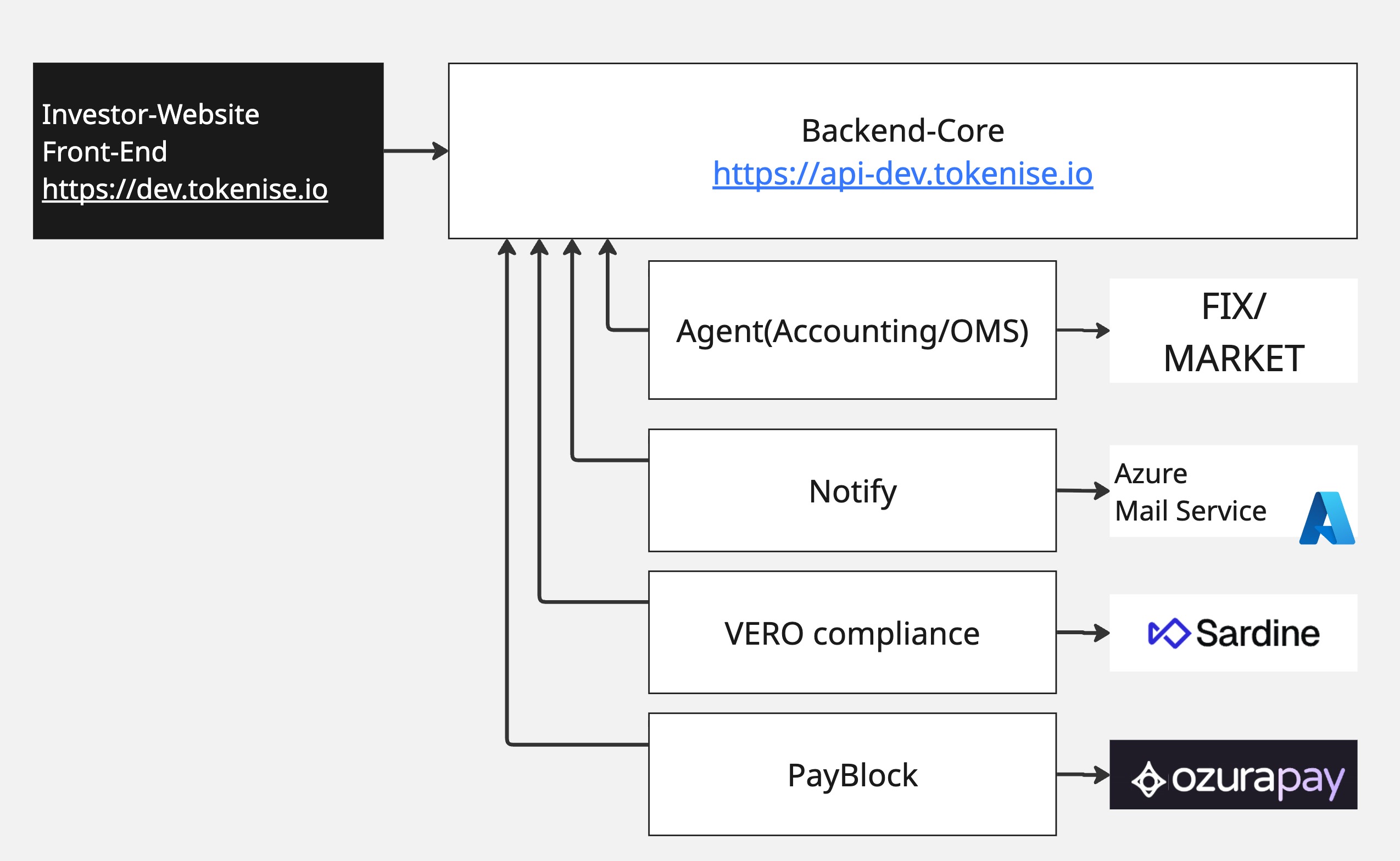
Backend-Core is the central coordination and business-logic layer.
- The Investor Website sends its API/WebSocket requests to Backend-Core.
- Backend-Core coordinates with other services: Agent (Accounting/OMS), Notify, VERO Compliance, and PayBlock.
- External integrations such as FIX/MARKET, Azure Mail Service, Sardine, and payment providers are reached indirectly through these services, not directly from the front-end.
The main idea is that Backend-Core focuses on orchestration and business rules, not on low-level integration details of each external system.
Main Functional Domains
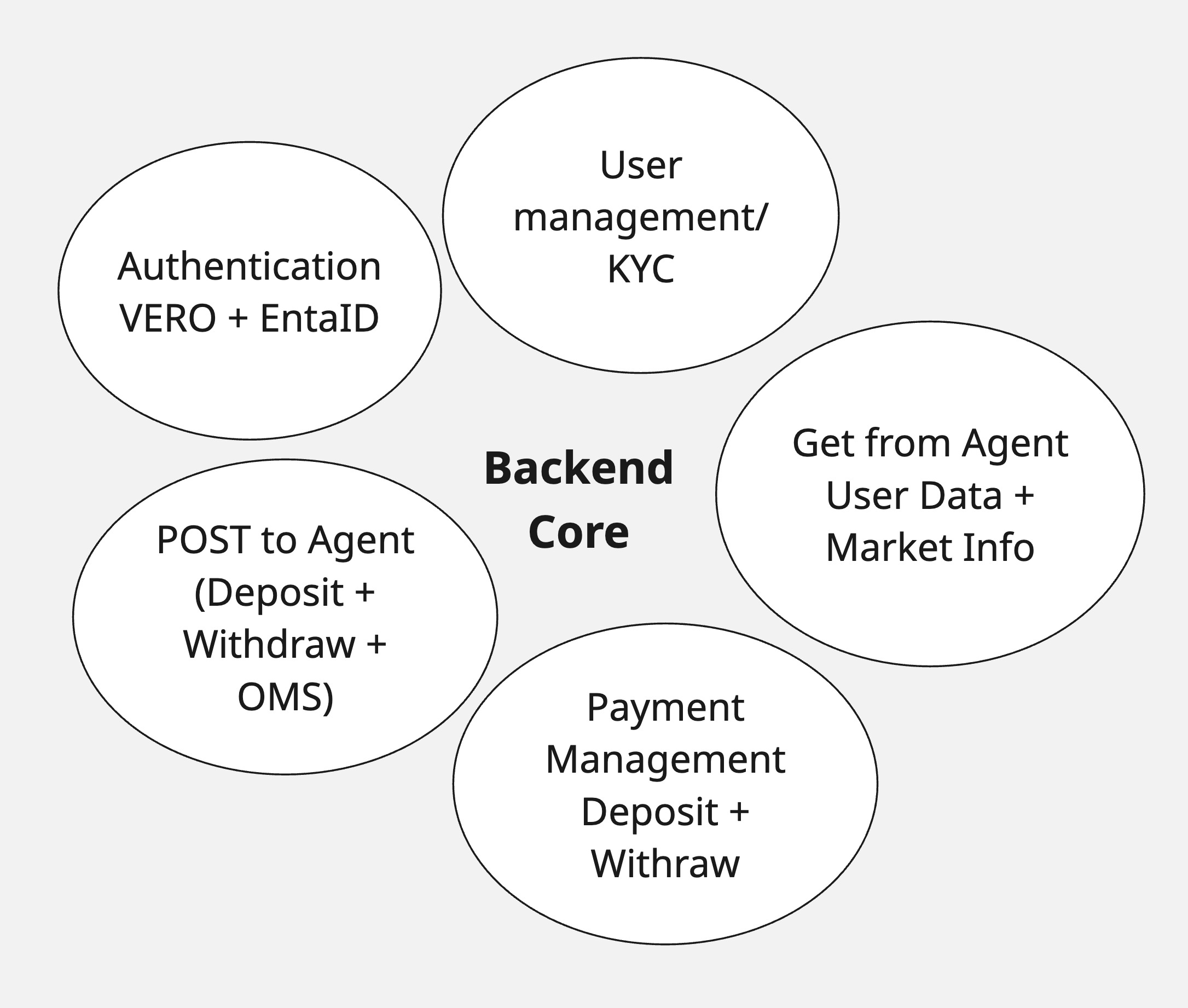
The key functional areas of Backend-Core are:
- Authentication (VERO + Entra ID)
- User management / KYC status
- Payment management (deposits and withdrawals)
- Posting to Agent (deposits, withdrawals, OMS-related operations)
- Getting data from Agent (user data, balances, market information)
Below, the same areas are explained through concrete scenarios.
1) Investor Login and Identity Handling
When an investor logs in:
- The Investor Website authenticates the user with VERO and receives a token.
- Backend-Core verifies this token with VERO.
- Backend-Core checks if this
veroIdalready exists in the broker database: - If it exists, the user is treated as an existing Investor.
- If it does not exist, Backend-Core stores the user as a new investor linked to that
veroId.
For admin users, access is controlled via Microsoft Entra ID instead of VERO:
- Entra ID is used for authentication.
- Backend-Core must clearly distinguish between:
- investor sessions (VERO-based)
- admin sessions (Entra ID–based)
So Backend-Core is responsible for handling both identity types correctly and applying the right logic depending on the context.
2) KYC Status & VERO Compliance Integration
For KYC, Backend-Core:
- Requests the current KYC status of a user from the Compliance service.
- Stores only the latest KYC status in its own database.
- If the user has not completed KYC, Backend-Core triggers the onboarding flow using the VERO Compliance SDK.
Important design decision:
- No KYC data is stored in Backend-Core.
- All detailed KYC data is stored centrally in the VERO Compliance database.
- Backend-Core only keeps:
- a reference to the user (e.g. via
veroId) - the latest KYC status (e.g. pending, approved, rejected)
Because of this:
- The Admin Panel does not show full KYC details.
- If someone needs to see KYC documents or detailed data, they must access the VERO Compliance Admin Panel, assuming they have the correct permissions there.
3) Deposit Flow Orchestration
When a user requests a deposit:
- Backend-Core records the deposit request and its parameters (amount, user, currency, etc.).
- Based on that data, Backend-Core calls VeroPay / PayBlock to reach the appropriate payment gateway.
- If the payment gateway responds with success, VeroPay/PayBlock notifies Backend-Core that the funds have been received.
- Backend-Core then considers the deposit as successfully funded and proceeds to the next step:
- It posts the deposit information to Agent, where the actual accounting and balance handling are implemented.
- Backend-Core controls and tracks the whole flow from:
- receiving the deposit request
- confirming that the money has arrived
- forwarding the corresponding accounting operation to Agent
The goal is to ensure the full chain is consistent: money received ↔ accounting entry created.
4) Order Handling via Agent
When a user submits an order:
- The Investor Website sends the order request to Backend-Core.
- Backend-Core validates the request and forwards it to Agent (Accounting/OMS).
- Agent is responsible for:
- all accounting and balance checks
- order handling and interaction with the market/FIX side
- Backend-Core receives status updates from Agent (e.g. accepted, filled, partially filled, rejected).
- Based on these statuses, Backend-Core:
- sends responses back to the front-end so the user sees the correct state
- can trigger notification requests (via Notify) when needed, such as order confirmations or status changes.
Backend-Core itself does not implement the low-level OMS/accounting logic; it orchestrates the flow and ensures that the user and UI always see the correct state.
5) Market Data and User Data from Agent
All market-related information consumed by the Investor Website is obtained through Backend-Core, which in turn reads it from Agent.
Examples:
- order book data
- prices
- other market information
- user-specific data that Agent maintains (e.g. balances)
Backend-Core:
- requests this data from Agent
- exposes it as APIs (and/or WebSockets) to the front-end
This keeps the data path clear:
- Agent is the source of truth for market and accounting data.
- Backend-Core is the access point and orchestrator for the front-end.